
In recent days, the international SEO community has been buzzing over an apparent contradiction in Google’s documentation. For years, we relied on the safety net of a 15MB infrastructure limit. Now, suddenly, the spotlight has shifted to a much stricter threshold: 2MB.
Is this a sudden resource cut? Is Google shrinking the web?
The reality is more nuanced and technically significant. We are not just witnessing a reduction in crawl capacity but a clear architectural separation between two distinct phases of data acquisition.If you manage a standard WordPress blog, you might stop reading here. But if you are dealing with Enterprise SEO, complex JavaScript frameworks (Next.js, Nuxt), or heavy e-commerce platforms, this “new” 2MB limit is a potential silent killer for your rankings.
Here is an advanced breakdown of what is happening, why the “15MB rule” was misunderstood, and how to architect your site to survive the cutoff.
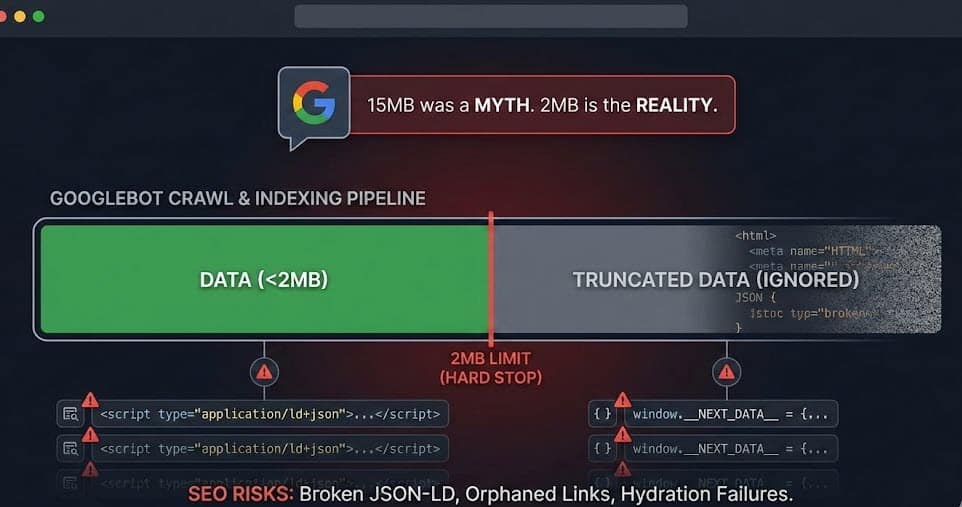
The Tale of Two Limits: Infrastructure vs. Application
To understand the risk, we must first clear up the confusion between the Network Layer and the Search Application Layer.
1. The “Infrastructure” Limit (15MB)
The 15MB figure—often cited in the past—refers to Google’s generic crawling infrastructure. This is a network-level protection mechanism designed to prevent Denial of Service (DoS) attacks, infinite loops, or the ingestion of massive binary files masked as text.
-
Scope: Raw data transfer.
-
Behavior: Googlebot can fetch up to 15MB effectively to protect its bandwidth and pipelines.
2. The “Search” Limit (2MB)
This is the game-changer clarified in recent updates. When crawling specifically for Google Search indexing, Googlebot applies a stricter application-level rule: it processes only the first 2MB of text-based files (HTML, TXT).
-
Scope: Indexing and Rendering pipeline.
-
Exception: PDFs are allowed up to 64MB (acknowledging their binary overhead).
The Critical Distinction: This limit applies to uncompressed (decoded) data. It doesn’t matter if your server sends a highly optimized GZIP file of 300KB. If that file expands to 2.5MB upon decompression, Googlebot will only “see” the first 2MB. The rest is truncated—lost in the void.
The “Cutoff” Disaster: Advanced Technical Implications
What happens when your HTML exceeds 2MB? Google doesn’t just “read slower”; it stops reading. This hard cutoff triggers a cascade of SEO failures that are often difficult to diagnose with standard tools.
1. The JSON-LD Black Hole
This is perhaps the most dangerous side effect. Modern development practices often push structured data scripts (application/ld+json) to the footer to avoid blocking the critical rendering path.
-
The Scenario: Your HTML is 2.1MB. The JSON-LD block starts at 1.9MB but ends at 2.1MB.
-
The Result: Googlebot cuts the stream at 2MB. The JSON syntax breaks (missing closing brackets
}), and the entire structured data block becomes invalid. -
The Cost: Loss of Rich Snippets, Merchant Center feeds, and breadcrumbs, seemingly overnight.
2. The Hydration Trap (SPA & SSR)
Single Page Applications (SPAs) using Server-Side Rendering (SSR) are the primary victims of HTML obesity. Frameworks like Next.js or Nuxt often inject the entire application state into a <script> tag (e.g., window.__NEXT_DATA__) to enable client-side hydration.
-
The Paradox: You are burning your precious 2MB budget on a JSON string that isn’t even visible content, just data for the browser to “wake up” the page. If this state is too large, it pushes actual footer content or links out of the indexable zone.
3. Orphaned Internal Links
Internal linking creates the architecture of your site. Footer links, “Related Products” sections, and mega-menus located at the bottom of the DOM are critical for distributing link equity.
-
The Risk: If the DOM is truncated before these sections, Googlebot never discovers those URLs. Your deep pages become orphaned, and crawl budget distribution becomes inefficient.
Diagnostics: How to Check Like an Engineer
Do not rely on the “file size” shown in your desktop folder or standard speed tests. You need to see what the bot sees.
Method A: The CURL Test Use the terminal to verify the raw, uncompressed size of your HTML document:
Bash
# Check the byte count of the decompressed body
curl -sL --compressed "https://your-site.com/critical-page" | wc -c
-
Red Flag: If the result approaches
2,000,000(bytes), you are in the danger zone.
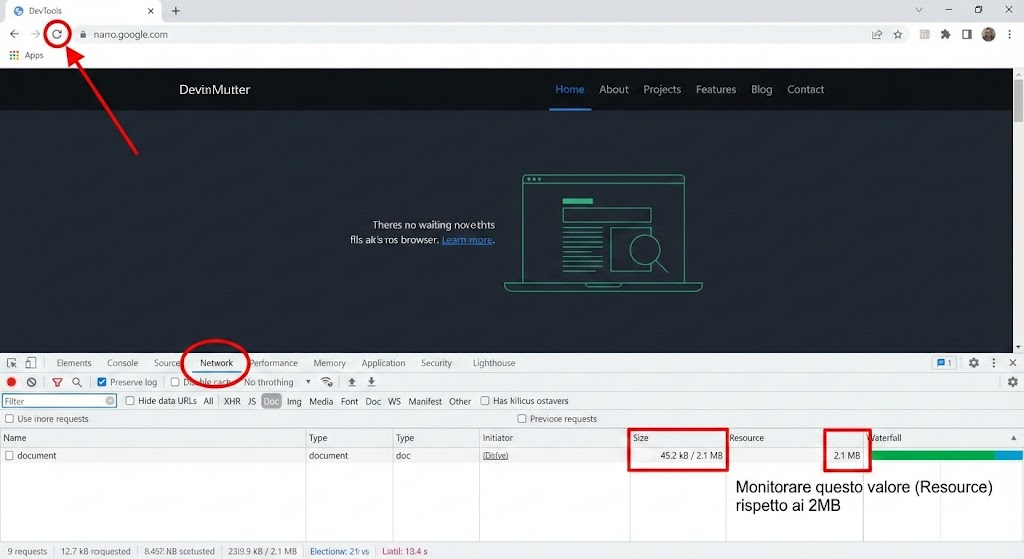
Method B: Chrome DevTools
-
Open Network Tab.
-
Reload the page.
-
Filter by Doc.
-
Compare Size (Transferred over network) vs. Resource (Decoded size).
-
The Rule: The Resource column must stay well under 2MB.
The 5 Causes of “HTML Obesity”
Based on audits of large-scale enterprise sites, these are the usual suspects:
-
Hydration Bloat: Passing unnecessary props or full API responses into the SSR state. Fix: Use Partial Hydration or “Island Architecture” (e.g., Astro).
-
Base64 Abuse: Inlining images directly into
src="..."adds ~33% overhead. Fix: Keep Base64 only for tiny, critical LCP icons (<1KB). -
CSS Inlining: Tools that inline “Critical CSS” often inline far too much. Fix: Inline only the fold; serve the rest asynchronously.
-
DOM Explosion: Hidden mega-menus with thousands of links or pre-rendered modals. Fix: Use
content-visibilityor fetch these on user interaction. -
Legacy Code: Old ASP.NET ViewStates or massive commented-out code blocks.
Strategic Opinion: Is This About AI?
A common theory is that Google is shrinking limits to save tokens for LLM (Large Language Model) processing. While plausible, it is technically imprecise.
The bottleneck isn’t just reading text—it’s the Web Rendering Service (WRS). Parsing, executing JS, and rendering a 5MB DOM requires exponential CPU and Memory compared to a 100KB page. The 2MB limit is likely a guardrail for computational efficiency in the rendering pipeline, ensuring that poorly coded sites don’t drain resources meant for the rest of the web.
Architecting for the Limit
The 2MB limit for Search is not a suggestion; it is a hard constraint. If you are close to this limit, do not optimize—refactor.
Priority DOM Order Strategy:
-
Top 100KB:
<head>, Critical Metadata, JSON-LD (move it up!),<h1>, and Intro Content. -
Next 1MB: Main Content, Primary Images.
-
The Danger Zone (>1.5MB): Third-party trackers, secondary footers, endless related items.
Treat an HTML file larger than 2MB as a critical bug. It’s not just about Googlebot; a text payload that massive is a failure in user experience engineering.
