
Table of contents 14 sections
- Why AI agents change the rules of the web
- The latest news: from Google to Cloudflare, the web becomes agent-ready
- What an “AI agent–optimized website” really means
- Traditional website vs agent-ready website
- Why installing a plugin isn’t enough
- Technical checklist for an AI agent–optimized website
- Technical example: buttons and forms must be readable by agents
- Managing AI crawlers: robots.txt and Content Signals
- The role of technical SEO and GEO
- Why relying on professionals is decisive
- What YourDigitalWeb can do
- Is your website ready for AI agents?
- FAQ on websites optimized for AI agents
- Sources and further reading
The web is no longer read only by human users and traditional crawlers. Today AI agents come into play: systems that can interpret pages, understand interfaces, plan actions and complete tasks on users’ behalf.
Why AI agents change the rules of the web
An AI agent doesn’t browse like a person. It doesn’t just “see” a page: it tries to interpret it through multiple technical signals. Google points to three main levels at which agents can read a site:
1. Screenshots
The agent can analyze the rendered page using vision models to identify buttons, forms, search areas, CTAs and visual hierarchies.
2. HTML and DOM
The agent reads the page structure, element hierarchy, attributes, classes, IDs and relationships between content blocks.
3. Accessibility tree
The accessibility tree summarizes the roles, names and states of interactive elements. For an AI agent it’s a true functional map of the interface.
If these signals are inconsistent, the agent may misinterpret the site. A button built as a simple <div>, a label not linked to a field, a CTA hidden by an overlay or a layout that keeps shifting can all become technical obstacles.
The latest news: from Google to Cloudflare, the web becomes agent-ready
In recent months the topic has become central for developers, SEO specialists, publishers and companies. It’s no longer a prediction about the future: guidelines, scores, policies and standards are already emerging to measure how ready a site is for AI agents.
| New | What it means | Impact for companies |
|---|---|---|
| Google web.dev: agent-friendly websites | Google encourages designing sites that are readable by AI agents too, not just by people and crawlers. | UX, accessibility and semantic HTML become even more important technical factors. |
| Cloudflare Agent Readiness Score | Cloudflare has introduced a score to assess whether a site is ready to interact with AI agents. | A technical metric is born for audits, development priorities and competitive advantage. |
| Content Signals Policy | Cloudflare proposes signals such as search, ai-input and ai-train to communicate content usage preferences. |
Managing AI crawlers becomes part of the site’s technical and legal governance. |
| WebMCP and emerging standards | New proposals aim to make the interaction between websites and agents more structured. | Websites will have to evolve from simple pages into clear, machine-readable systems that can be queried. |
| AI SEO and GEO | SEO is expanding toward Generative Engine Optimization and visibility in AI systems. | Ranking on Google isn’t enough: you need to be understood by generative engines, LLMs and agents. |
What an “AI agent–optimized website” really means
A website optimized for AI agents is a site designed to be correctly interpreted by automated systems. Having text content isn’t enough. You need consistent signals across interface, code, data, performance and information structure. An agent must be able to understand:
- what the page’s main content is;
- which elements are interactive;
- which buttons move a journey forward;
- what each form field corresponds to;
- which information is up to date and reliable;
- which pages are linked to each other;
- which content AI crawlers can read;
- which data is structured for reuse;
- which actions are available to the user;
- which path leads to conversion, contact or purchase.
Optimization for AI agents combines technical SEO, web development, accessibility, UX design, content engineering, structured data and security. It’s cross-functional work, not a superficial fix.
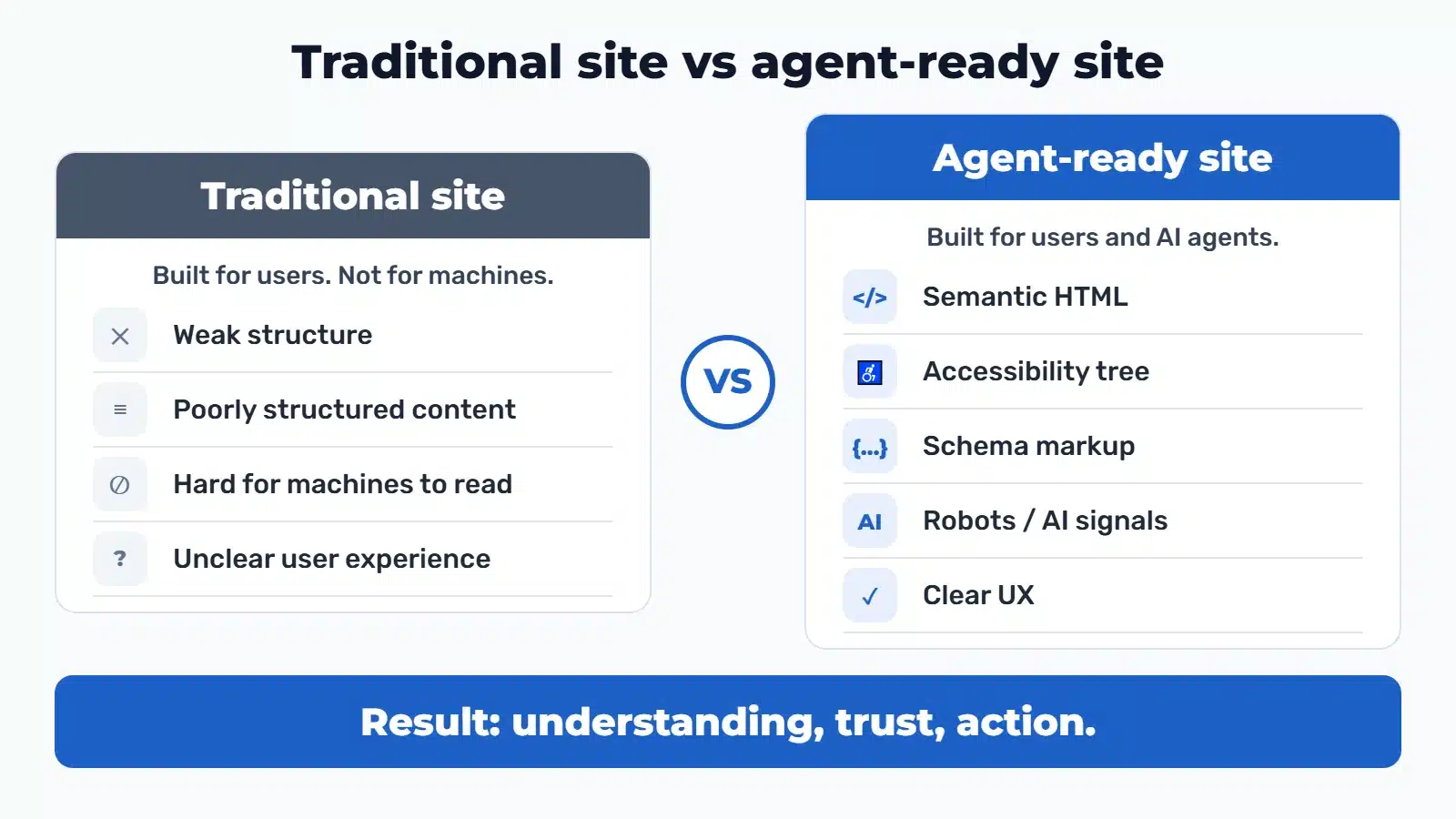
Traditional website vs agent-ready website
| Element | Traditional website | Agent-ready website |
|---|---|---|
| HTML | Markup often driven only by the visual layout. | Semantic markup, correct hierarchies, recognizable interactive elements. |
| UX | Designed mainly for the human eye. | Designed for users, screen readers, crawlers and AI agents. |
| Accessibility | Often treated as a secondary requirement. | Becomes a technical foundation for making the site interpretable. |
| Content | Written for people and classic search engines. | Organized around entities, intents, semantic relationships and generative systems. |
| AI crawlers | Minimal or no management. | Policies, robots.txt, AI signals and access control. |
| Conversions | Depend only on human navigation. | Must also be understandable to agents completing tasks for the user. |
Why installing a plugin isn’t enough
Many companies will look for shortcuts: plugins, automatic scripts, generic AI tools or minimal changes to the site. The problem is that optimizing for AI agents isn’t a feature you “switch on.” It’s technical design. A plugin can’t fix on its own poor information architecture, a messy DOM, inconsistent content, inaccessible templates, wrong structured data or an outdated SEO strategy.
This is where professionals come in
Making a site truly agent-ready requires integrated skills: developers, SEO specialists, UX designers, accessibility experts, content strategists and AI consultants. Only a professional approach can turn the site into digital infrastructure ready for the new web.
Technical checklist for an AI agent–optimized website
A professional audit should check at least these areas:
| Technical area | Main checks | Why it matters |
|---|---|---|
| Semantic HTML | Correct use of <button>, <a>, <label>, headings, landmarks and forms. |
Agents better understand actions, hierarchies and relationships between elements. |
| Accessibility tree | Checking roles, accessible names, states, focus, tab order and associated labels. | The accessibility tree works as a functional map for agents and assistive technology. |
| Layout stability | Checking CLS, dynamic elements, overlays, pop-ups and sudden changes. | Agents can get confused if elements change position during interaction. |
| Structured data | Schema.org, Organization, LocalBusiness, Product, FAQ, Article, Breadcrumb. | Structured data helps AI systems and search engines understand entities and relationships. |
| Robots and AI crawlers | Robots.txt, sitemap.xml, AI bot policies, content signals, log analysis. | You need to control who accesses the content and how it can be used. |
| Content for LLMs | Semantic clarity, structured sections, FAQs, definitions, sources, updates. | Generative engines reward content that is interpretable, reliable and contextualized. |
| Performance | Core Web Vitals, JS loading, rendering, mobile performance, caching. | A slow or unstable site reduces experience quality and technical readability. |
| Conversion path | Forms, CTAs, e-commerce flow, bookings, checkout, lead generation. | Agents must be able to identify the correct path to complete a task. |
Technical example: buttons and forms must be readable by agents
A common mistake is using non-semantic elements to simulate interactive components. To a human user everything may look fine, but to an AI agent or a screen reader the information can be ambiguous.
Example to avoid
<div class="btn-primary" onclick="submitForm()"> Request a consultation </div>Correct example
<button type="submit" class="btn-primary"> Request a consultation </button>The same goes for forms. Every field must have an associated label, because the system needs to understand precisely what the user or agent must enter.
<label for="email-consulenza">Business email</label> <input id="email-consulenza" name="email" type="email" autocomplete="email" required>Managing AI crawlers: robots.txt and Content Signals
Another increasingly important topic is managing access to content. AI crawlers aren’t all the same: some index for search, others use content as input for generative answers, and others may acquire data for training or fine-tuning. Cloudflare introduced the Content Signals Policy to express machine-readable preferences through the robots.txt file. The main signals are:
- search: use for indexing and search results;
- ai-input: use as input for AI models, RAG or generative answers;
- ai-train: use for training or fine-tuning AI models.
Configuration example:
User-Agent: * Content-Signal: search=yes, ai-train=no Allow: /Note: robots.txt configuration, AI policies and bot control systems should be assessed case by case. Blocking or allowing crawlers without a strategy can affect visibility, AI SEO, editorial content and business model.
The role of technical SEO and GEO
SEO isn’t disappearing. It’s evolving. Today organic visibility must also account for generative search engines, AI Overviews, conversational assistants, chatbots, RAG systems and autonomous agents. This means working on:
- semantic content structure;
- entity-based SEO;
- optimization for conversational queries;
- authoritative, up-to-date and verifiable content;
- technical FAQs and clear informational sections;
- Schema.org and structured data;
- topical internal linking;
- performance and crawlability;
- presence in AI engines and generative systems;
- monitoring AI-driven visibility.
YourDigitalWeb already works on AI SEO, GEO and visibility strategies for generative search engines. The goal isn’t just to rank a site, but to make it understandable and authoritative for increasingly automated digital ecosystems.
Why relying on professionals is decisive
Optimizing for AI agents touches very different areas. An uncoordinated effort can create problems: inconsistent structured data, unreliable content, apparent but not real accessibility, wrong crawler blocks, degraded performance or conversion paths that can’t be interpreted. Relying on professionals means having a complete view:
Strategy
Defining goals for visibility, conversion, content control and positioning in AI engines.
Technical development
Correct implementation of semantic HTML, performance, accessibility, structured data and site architecture.
Monitoring
Analysis of results, logs, AI crawlers, Search Console, generative visibility and continuous updates.
An agent-ready website isn’t a static project. It’s digital infrastructure that must evolve with standards, search engines, language models and user behavior.
What YourDigitalWeb can do
YourDigitalWeb designs professional websites as true business channels: scalable, high-performing, functional and built for visibility. With the evolution of AI, this approach becomes even more important. To make a site ready for AI agents, we can work on:
- technical SEO and AI readiness audits;
- HTML and DOM analysis;
- accessibility tree checks;
- optimization of forms, CTAs and conversion paths;
- implementation of Schema.org structured data;
- robots.txt, sitemap and AI crawler analysis;
- content optimization for LLMs and generative engines;
- GEO and AI SEO consulting;
- performance and Core Web Vitals optimization;
- monitoring visibility in AI systems.
Is your website ready for AI agents?
The future of online visibility won’t just be about being found. It will be about being understood, chosen and used correctly by people, search engines and artificial agents.
Request a technical audit from YourDigitalWeb and find out whether your site is truly agent-ready.
FAQ on websites optimized for AI agents
What is an agent-ready website?
It’s a site designed to be understood not only by users and search engines, but also by AI agents. It needs semantic structure, accessibility, clear content, structured data and readable interaction paths.
Does optimizing a site for AI agents also help SEO?
Yes. Many agent-ready optimizations coincide with SEO best practices: clean HTML, accessibility, performance, structured content, semantic data and clear information architecture.
Do you need to rebuild the site from scratch?
Not always. In many cases you start with a technical audit to understand what to fix: templates, interactive components, content structure, structured data, performance, robots.txt and AI crawler management.
Can a plugin make a site ready for AI agents?
No, not on its own. Plugins can help with individual functions, but real optimization requires technical, strategic and SEO skills. It takes professional work on code, UX, content and governance.
Sources and further reading

Davide Prevosto
Senior Developer and Technical Consultant
Senior developer and technical consultant at YourDigitalWeb, he handles the technical side of SEO and GEO projects. He co-authored the book “Generative SEO” (Edizioni LSWR) with Marco Maltraversi and Giovanni Sacheli.
One click and, when you search for SEO, AI and marketing, our articles will show up more often in Google’s Top Stories.